If you've ever been puzzled by the infamous react-hooks/exhaustive-deps warning — or worse,
silenced it just to move forward — this article is your turning point.
By the end of this deep dive, you will:
- completely understand what React effects really are
- learn how to eliminate subtle bugs
- debug broken effect logic with confidence
- avoid stale closures and infinite loops
- master how to apply advanced optimizations to
useEffect - trace any
useEffectissue back to its source and handle it properly
The useEffect hook is one of the most misunderstood APIs in modern React, and even experienced
developers sometimes make mistakes with it. In fact, the Cloudflare Dashboard Outage on
September 12, 2025 — as Cloudflare itself explained — originated from incorrect usage of
useEffect in their front-end.
Why does this happen? Largely because most tutorials and courses explain how to use the hook, but rarely clarify why it exists, what problem it solves, and the conceptual model behind its behavior — opening the door to common misuses.
This article builds a clear mental model from the ground up, connecting computer science fundamentals to React's architecture and fiber scheduler. Let's begin where everything starts: side effects.
The Core Concept: Side Effects
In computer science, a function has a primary effect: read inputs and return a value.
Anything beyond this is a side effect, such as:
- mutating external variables
- throwing exceptions
- performing I/O
- network requests
- DOM mutations
- interacting with browser APIs
Side effects are not completely "bad", but they make reasoning more complex. That's why the Functional Programming paradigm pushes for pure functions: predictable, testable, easily composable.
React also embraces purity in its rendering process. The official documentation is clear:
React's rendering process must always be pure. Components should only return their JSX, and not change any objects or variables that existed before rendering — that would make them impure!
Purity is essential because React may re-render your components:
- more times than you expect
- out of order
- in batches
- in development (Strict Mode double-render — see how StrictMode boosts code quality)
- during transitions
- during suspense retries
React needs to safely re-execute components at any time. But web apps must interact with the outside world. So how do we combine purity with interactivity?
The purpose of Effects in React
Event handlers are the first natural mechanism for side effects:
<button onClick={handleClick}>Click</button>Handlers are defined during render but executed after render and only in response to user interaction. Therefore, they don't break purity.
But sometimes a component needs to synchronize with external systems because it rendered, not because the user clicked something:
- update
document.title - interact with
localStorage - attach event listeners
- manage WebSocket connections
- scroll to an element
- integrate with browser APIs
These are side effects that arise from the component's render phase, and they should be scheduled
as effects. This is exactly why useEffect exists.
React guarantees purity during render, and schedules effects to run after render, in the commit phase.
The fundamental mechanics of useEffect
Now that we know the true purpose of the hook, let's understand its syntax and execution.
useEffect(setup, deps?)It returns undefined and accepts two arguments:
setup: a function containing the logic of your Effect, which may or may not return a cleanup function (we'll see it later).deps(optional): an array of dependencies.
The effect executes the setup function after the component renders. By default, it would
run after every render, but we rarely want that — which is why we use the dependency array, most
of the time, even when it's empty. Here's how the effect responds to each shape of that argument:
Dependency Array (deps) | Effect Behaviour |
|---|---|
| Omitted | Runs after every render. |
[] (Empty Array) | Runs the effect only after the first render and the cleanup when the component unmounts. |
[var1, var2] | Runs after the first render and whenever var1 or var2 changes. |
How the dependency array is compared
Change checking in the dependency array is performed using Object.is(). If an object, array,
or function is recreated on every render — common when defined inside the component — it will be
considered different even if its fields and values are identical, and the effect will re-run.
This happens because objects and functions are Reference Types in JavaScript: they don't store a
value, only a reference to a memory location, which is new every time you create one.
One of the most common and dangerous errors is believing we can populate the dependency array as we wish. On the contrary, the list of dependencies must be dictated by the Effect itself: it must contain every reactive value used inside it — every prop, state variable, and function declared inside the component.
To avoid bugs from an incorrectly populated dependency list, our greatest ally is a linter configured for React. It tells us exactly how the list should be filled, based on the code inside our Effect. Its warnings should not be suppressed — quite the opposite: the official React documentation tells us to treat them as compilation errors, given the high risk of bugs from misusing the dependency array. It's tempting to think a dependency can simply be removed; in reality, removing one requires changing the surrounding code to "prove" to the linter that the value is no longer reactive.
Before we get to removing dependencies correctly, let's close the loop on useEffect's syntax with
its last, but not least important, piece: the cleanup function.
If an Effect runs multiple times — creating subscriptions or listeners, for example — we need a way
to cancel the previous subscription or remove the previous listener, or we risk memory leaks and
other unexpected behavior. For this, the setup function can return another function: the
cleanup function.
useEffect(() => {
  // setup code
  return () => {
    // This is the cleanup function.
    // It runs to "undo" the previous setup.
  }
}, [deps])
The cleanup function runs (1) before each new execution of the Effect, after the first one, and (2) one final time when the component unmounts — ensuring the previous effect is properly terminated before a new one starts.
Strategies for removing Effect dependencies
Sometimes a dependency list looks wrong, or a value seems to change more often than it should — recreated on every render, for instance. That can genuinely happen, but a dependency can never be removed abruptly without changing the surrounding code to match.
The first step is to check whether the Effect really is an Effect, or whether it should be an Event Handler:
Once you're certain the logic truly belongs in useEffect, verify that it performs only one
synchronization process. This prevents dependencies from an unrelated process from causing
unnecessary re-execution.
With that settled, we turn to the reactive values the Effect actually references. This reveals a few distinct scenarios, each with its own solution strategy. The first three all try to avoid objects and functions inside the dependency array.
Scenario 1: Objects or functions without reactive values
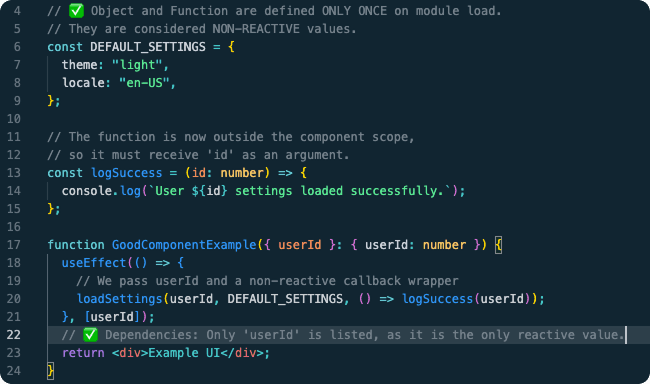
The first thing to check is whether these entities rely on any reactive values (props or state) at all. If they don't, we can move their declaration outside the component's scope entirely, giving them a stable reference that's treated as non-reactive.
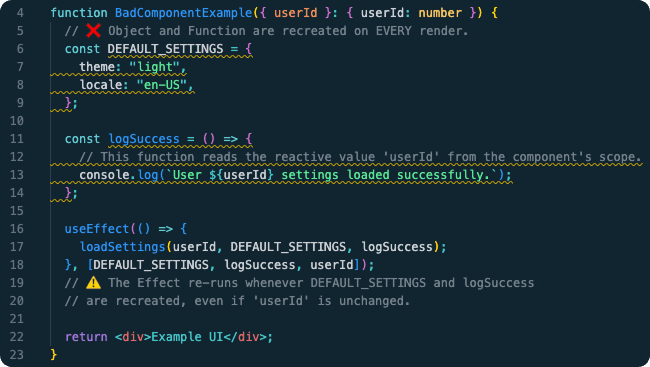
As expected, the linter reports a problem with both the object and the function declaration:
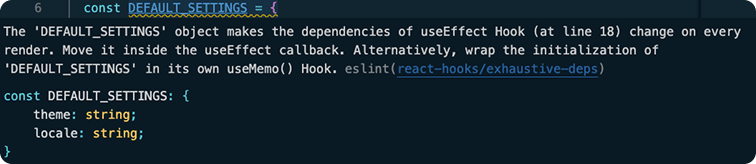

This shows why a well-configured linter — specifically the react-hooks/exhaustive-deps rule — is
so important. It suggests two common fixes: moving the initialization inside the Effect, or
wrapping it in useMemo() / useCallback().
Moving the initialization inside the Effect resolves the warning, but adds unnecessary work on
every run. The useMemo() / useCallback() fix is more interesting, and we'll detail it in
Scenario 3.
In this specific case — objects and functions that don't rely on reactive values — the best solution is the simplest one: move the declaration completely outside the component's scope.
Scenario 2: Using specific properties of complex objects
When an Effect only needs a subset of a larger object's properties — say, a user prop — depending
on the entire object is inefficient: its reference changes on nearly every re-render, so the
Effect re-runs unnecessarily. The fix is destructuring: extract only the primitive values the
Effect actually needs, and list only those in the dependency array.
type GoodComponentExampleProps = {
  settings: Settings
}

function GoodComponentExample({ settings }: GoodComponentExampleProps) {
  const { trackMouse } = settings // ✅ destructure the primitive we need

  useEffect(() => {
    if (!trackMouse) return // ✅

    const handleMouseMove = (event: MouseEvent) => {
      console.log(`mouse position: { x: ${event.clientX}, y: ${event.clientY} }`)
    }

    window.addEventListener('mousemove', handleMouseMove)
    return () => window.removeEventListener('mousemove', handleMouseMove)
  }, [trackMouse]) // ✅ not [settings] — depends only on what's necessary

  return <div>GoodComponentExample</div>
}
If the Effect depended on the whole settings object, it would run every time any of its
properties changed. By destructuring and depending only on the primitive trackMouse, we avoid
that.
Scenario 3: Non-stable references created during render
If neither of the previous strategies applies, the issue is likely a non-stable reference: a
literal object ({...} or [...]) or a function declared directly inside the component body.
Every re-render creates a brand-new memory reference for it, so an Effect depending on it
re-executes unnecessarily — and can even cause an infinite loop.
The strategy is to memoize the value so its reference stays stable across renders:
useMemofor objects, arrays, or calculated values.useCallbackfor functions.
useMemo executes its calculateValue function and memoizes the returned value; useCallback
only memoizes the function definition, guaranteeing the Effect always receives the same stable
reference. The function passed to useMemo runs during render, so it must be pure and take no
arguments — relying entirely on its own dependency array for any reactive values it needs.
Scenario 4: Reading a reactive value without "reacting" to it
Sometimes an Effect needs the latest value of a reactive variable, but should only re-run when a different, unrelated dependency changes. Including that variable in the dependency array forces unnecessary re-runs.
The right fix depends on the React version:
React 19.2 and newer — useEffectEvent
The modern solution is useEffectEvent, which extracts non-reactive logic out of the Effect. The
function it returns is guaranteed stable — its reference never changes — so it doesn't belong in
the dependency array.
type ChatProps = {
  roomId: number
  notificationCount: number
}

function Chat({ roomId, notificationCount }: ChatProps) {
  const onVisit = useEffectEvent((visitedRoomId) => {
    console.log(visitedRoomId, notificationCount)
  })

  useEffect(() => {
    onVisit(roomId)
  }, [roomId]) // ✅ all dependencies declared

  return <div>Chat Room {roomId}</div>
}
The official documentation lists three caveats worth keeping in mind:
Caveats
- Only call inside Effects. Effect Events should only be called within Effects. Define them just before the Effect that uses them; don't pass them to other components or hooks. The
eslint-plugin-react-hookslinter (6.1.1+) enforces this.- Not a dependency shortcut. Don't use
useEffectEventto avoid specifying dependencies — that hides bugs and makes the code harder to understand. Prefer explicit dependencies, or refs to compare previous values when needed.- Non-reactive logic only. Use
useEffectEventonly to extract logic that doesn't depend on changing values.
Before React 19.2 — useRef + useCallback
For older React versions, the established pattern is to store the latest reactive value in a
useRef, read from a stable useCallback handler. This requires a separate useEffect whose only
job is to keep the ref updated, so the primary Effect always reads current data without depending
on it.
type ChatProps = {
  roomId: number
  notificationCount: number
}

function Chat({ roomId, notificationCount }: ChatProps) {
  const notificationCountRef = useRef(notificationCount)

  useEffect(() => {
    notificationCountRef.current = notificationCount
  }, [notificationCount])

  const onVisit = useCallback((currNotificationCount: number, roomId: number) => {
    console.log(currNotificationCount, roomId)
  }, [])

  useEffect(() => {
    onVisit(notificationCountRef.current, roomId)
  }, [onVisit, roomId])

  return <div>Chat Room {roomId}</div>
}
Important Note on Data Fetching
Although technically possible, the React documentation itself advises against using
useEffect for data fetching in modern applications:
Writing
fetchcalls inside Effects is a popular way to fetch data, especially in fully client-side apps. This is, however, a very manual approach and it has significant downsides:
- Effects don't run on the server. The initial server-rendered HTML only includes a loading state with no data — the client has to download all JavaScript and render the app just to discover it needs to load data. Not very efficient.
- Fetching directly in Effects makes it easy to create "network waterfalls." The parent component renders, fetches data, renders the children, and only then do they start fetching their own data — much slower than fetching in parallel.
- Fetching directly in Effects usually means no preloading or caching. If a component unmounts and mounts again, it fetches the data again.
- It's not very ergonomic. There's a fair amount of boilerplate to avoid bugs like race conditions.
This isn't specific to React — it applies to fetching on mount with any library. We recommend:
- If you use a framework, use its built-in data fetching mechanism. Modern React frameworks have integrated, efficient data fetching that avoids the pitfalls above.
- Otherwise, use or build a client-side cache. TanStack Query, useSWR, and React Router 6.4+ are popular options. You can build your own too — in which case you'd still use Effects under the hood, plus logic for deduplicating requests, caching responses, and avoiding waterfalls.
Libraries like these handle synchronization, caching, revalidation, and cleanup far more
efficiently and robustly than a hand-rolled useEffect, abstracting away this specific use case.
Final Thoughts
Mastering useEffect isn't about memorizing rules — it's about building a mental model.
Effects exist because React must keep rendering pure. Effects run after commit so React can safely synchronize with external systems.
When you understand:
- purity
- reactive values
- dependency correctness
- stable references
- cleanup behavior
- synchronization patterns
- modern data fetching strategies
...everything about useEffect becomes predictable. You stop fighting the linter. You stop
getting trapped by stale closures. You start reasoning like a senior React engineer.
And most importantly: you will never again suppress react-hooks/exhaustive-deps just to move
forward.